Use any computer as if you were right there
Connect to your own computer or any other from wherever you are.We have native remote desktop apps for Windows, Mac and Linux, with end-to-end encryption.
Free for personal use · No credit card

All your computers, one click away
Save your computers: the one at home, the one at the office, the server. From the apps you can see which ones are on and get into any of them without anyone having to accept you.
- Native apps for Windows, Mac, Linux and soon iOS and Android
- Access without anyone having to be there to approve it, on any device
- On every paid plan you can save unlimited computers to connect with one click


Remote access without the hassle
The solution you need to use another computer wherever you are, with no odd setup and no touching your router or ports.
Unattended access
Get into your computer at any time, without anyone having to be there. Our apps let you connect even from the sign-in screen. Also works with Windows Server.
Remote access to your computers
End-to-end encryption
In every session, both computers verify their unique security codes to guarantee an end-to-end encrypted connection, so no third party, including us, can access the information sent.
Ctrl+Alt+Del in one click
Unlock a remote Windows PC or open its security screen from the session toolbar.
Direct connection
Your computers connect directly to each other without relying on our servers. If something fails, an end-to-end encrypted relay has you covered.

The remote screen at its best resolution
Fit to the window, pixel for pixel, or with the window sized exactly to the other screen.
Shared clipboard
Copy on one computer and paste on the other, both ways.
One team, all its devices under control
On the Team and Business plans, invite your colleagues by email and manage every device from one place. Each user gets into their own computers, while admins see the whole picture. Simultaneous connections are shared by everyone on the team.
Resolution that fits
When you connect to a Windows PC, its screen fits your window. On servers and virtual machines with no monitor, RemoteBite adds a virtual display so it looks just right.
Drag and drop files
Drag files from your desktop onto the session window and they show up on the other computer, in Downloads › RemoteBite. They travel end-to-end encrypted, just like the picture.
Power on your computers remotely
Is your office computer off? Press «Power on» in your list and another of your computers on that network will send it the Wake-on-LAN signal, and you'll be in within a minute.
How remote power on worksHear what plays on the other computer
Turn on the speaker in the session toolbar to hear videos, alerts or calls from the other computer. It always starts muted and is end-to-end encrypted.
Connect to any computer in three steps
To get into someone else's computer, all you need is its number. For yours, not even that: one click from your list.
1. Type its number
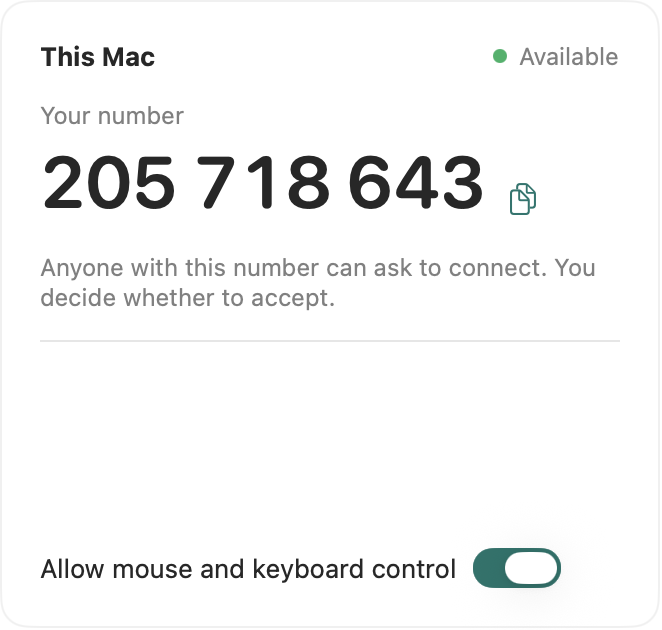
Every computer with RemoteBite has a 9-digit number. Type it on yours and press Connect.
2. They accept on the other end
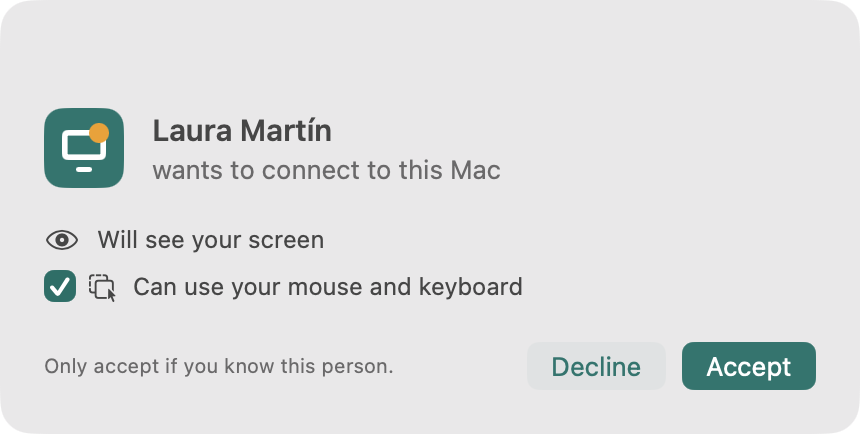
Whoever is there decides whether you can use the mouse and keyboard or just watch. Not needed on your own computers.
3. And you're in

Use the other computer as if you were there, with a shared clipboard and everything encrypted.


Pay for connections, not for people
A flat price with simultaneous connections for your whole team.Pay yearly and get 2 months free.
Team
Most popular$69/month
- 10 simultaneous connections
- Unlimited computers
- Invite your team by email
Business
$129/month
- 50 simultaneous connections
- Unlimited computers
- Invite your team by email
More than 50 simultaneous connections? Let's talk about an unlimited plan
Your computer, from anywhere
Install it on the computers you want to reach and connect in seconds.Coming from AnyDesk or TeamViewer? See how we compare.